Overview
PJN Mobile sends Depletion Notifications to inform you when your bundle is running low or has been depleted. If you prefer not to receive these notifications, you can opt out at any time using the USSD self-service menu.
This guide walks you through the opt-out process step by step using *135#.
Before You Start
- Your PJN Mobile SIM must be active.
- You must have airtime available to initiate a USSD session.
- USSD sessions are free of charge on PJN Mobile.
Step-by-Step Guide
Step 1.
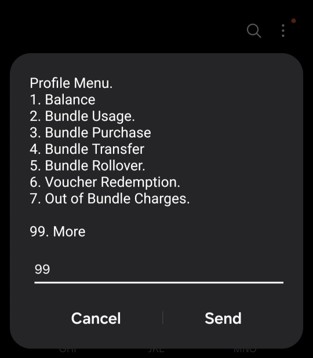
Dial *135# from your PJN Mobile number to open the USSD menu. The Profile Menu will appear with a list of options.
Step 2.
From the Profile Menu, select 99. More and press Send.
Step 3.
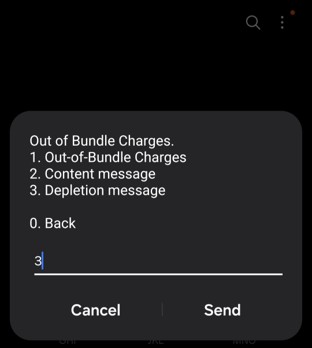
The Out of Bundle Charges menu will appear. Select 3. Depletion Message and press Send.
Step 4.
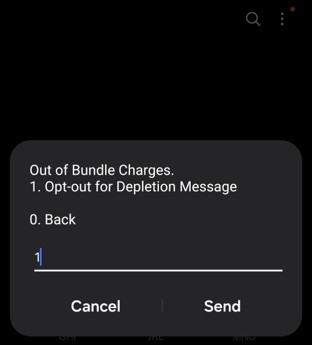
The Depletion Message sub-menu will appear. Select 1. Opt-out for Depletion Message and press Send.
Step 5.
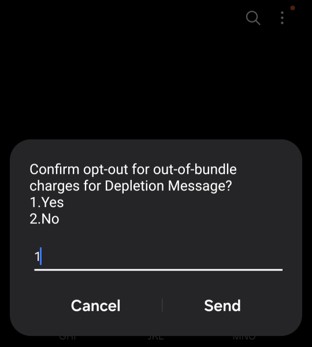
You will be asked to confirm your opt-out. Select 1. Yes, to confirm, or 2. No to cancel. Enter your selection and press Send.
Step 6.
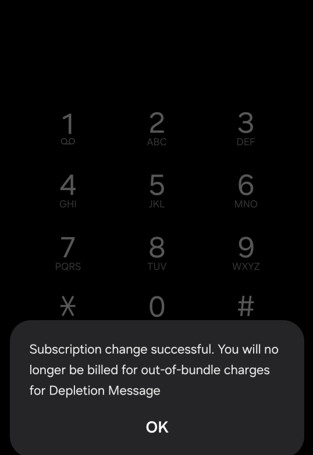
A confirmation message will appear: "Subscription change successful. You will no longer be billed for out-of-bundle charges for Depletion Message." Press OK to close.
Note: You can re-enable Depletion Notifications at any time by following the same steps and selecting Opt-in instead of Opt-out.
Troubleshooting
Issue | What to Do |
USSD session times out or disconnects mid-process | Dial *135# again and restart from Step 1. Ensure you have network signal before starting. |
Menu options don't match what's described in this guide | Menu numbering can occasionally change. Read each on-screen option carefully and select the one matching the action described, rather than relying solely on the number shown here. If you're still unsure, contact PJN Mobile support. |
No confirmation message received after opting out | Dial *135# and repeat the steps to confirm your current opt-in/opt-out status. If the setting does not change, try again or contact PJN Mobile support. |
Was this article helpful?
That’s Great!
Thank you for your feedback
Sorry! We couldn't be helpful
Thank you for your feedback
Feedback sent
We appreciate your effort and will try to fix the article