Overview
This guide explains how to redeem an airtime voucher on your PJN Mobile SIM card using the USSD self-service menu. Follow the steps below to top up your airtime balance quickly and easily.
Step-by-Step Guide
Step 1
Dial *135# on your PJN Mobile SIM
Open your phone's dialler and dial *135#, then press the call button.
This will launch the PJN Mobile USSD self-service menu.
Note: Make sure you are dialling from your PJN Mobile SIM card.
Step 2
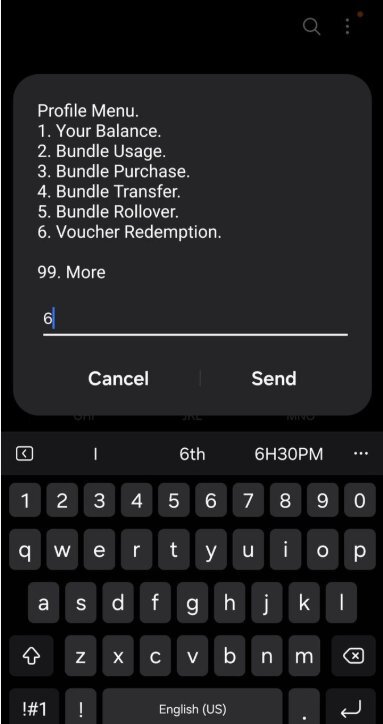
Select Option 6 — Voucher Redemption
From the Profile Menu that appears on screen, type 6 and tap Send.
This will take you to the voucher redemption screen where you can enter your PIN.
Step 3
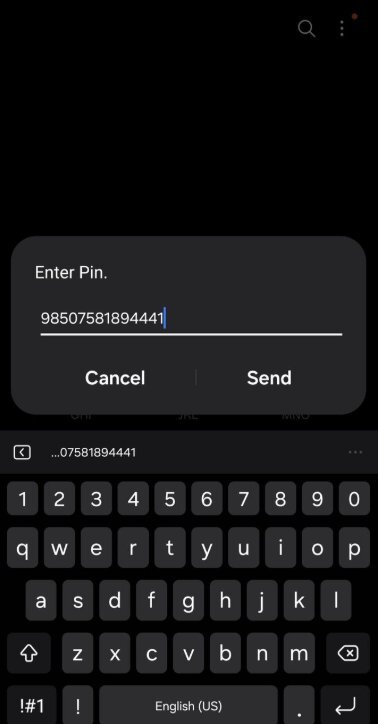
Enter your Voucher PIN
Type in the PIN number printed on your airtime voucher.
Double-check the number carefully before tapping Send.
Note: Your voucher PIN is typically a 14-digit number found on your recharge slip or voucher.
Step 4
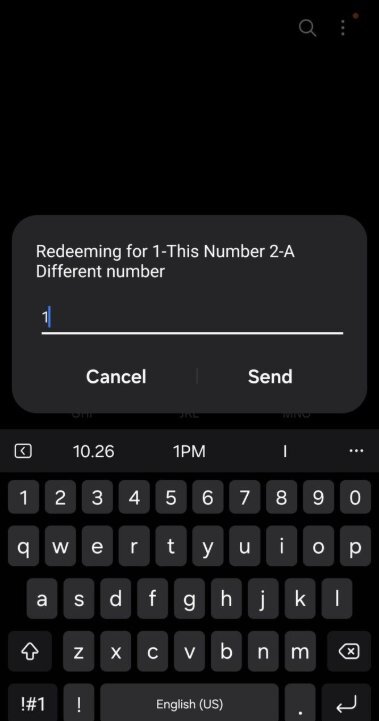
Select which number to load the airtime to
You will be asked whether to load the airtime to:
Option 1 — This Number (your current PJN Mobile number)
Option 2 — A Different Number
Select your preferred option and tap Send.
Note: If loading to a different number, you will be prompted to enter that number. This must be a PJN Mobile or Cell C number — vouchers cannot be redeemed to numbers on other networks.
Step 5
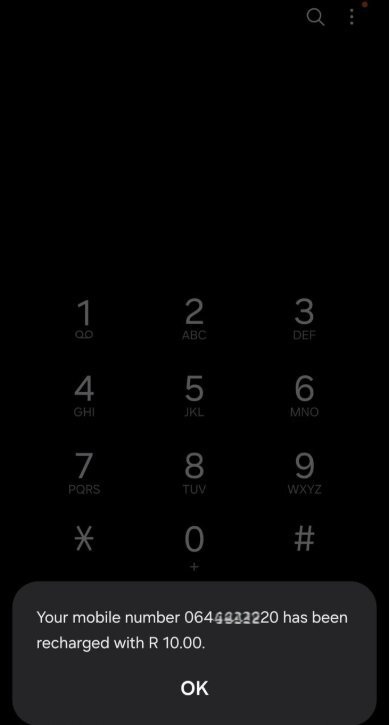
Confirmation — Airtime Successfully Loaded
A confirmation message will appear on your screen confirming that your mobile number has been recharged with the voucher amount.
Your airtime balance will be updated immediately.
Note: If you do not receive a confirmation message, please contact PJN Mobile support.
Troubleshooting
Issue | What to Do |
Voucher PIN is rejected as invalid | Double-check the PIN against your voucher slip — it's easy to misread a 0 for an O or a 1 for an I. Re-dial *135# and try again. If it's still rejected, contact PJN Mobile support. |
Voucher says it has "already been redeemed" | Each voucher can only be redeemed once. If you're sure you haven't redeemed it before and the voucher is unused, contact PJN Mobile support with your voucher slip details. |
USSD session times out or disconnects mid-process | Dial *135# again and restart from Step 1. Ensure you have network signal before starting. |
Entered the wrong recipient number in Step 4 | Voucher redemptions cannot be reversed once confirmed. Always double-check the recipient's number carefully before sending. PJN Mobile is unable to recover or refund a voucher redeemed to the wrong number. |
Protecting Yourself from Fraud
A voucher PIN has real monetary value, much like cash, which makes it a target for scams. Be aware of the following scenarios and never act on unsolicited requests.
Fraud Scenario | What to Do |
Someone calls or messages claiming to be PJN Mobile and asks you to read out your voucher PIN to "verify" or "activate" it | PJN Mobile will never ask for your voucher PIN over the phone or via message. Hang up and redeem your voucher yourself via *135#. |
A stranger or unknown contact offers to redeem your voucher for you, or sends you a "voucher redemption" link | Vouchers can only be redeemed via *135# on your own phone. Do not click links or share your PIN with anyone offering to redeem it on your behalf — once shared, the value can be claimed by anyone. |
You're offered a "discounted" or "bulk" voucher PIN by someone outside official retail channels | Only purchase airtime vouchers from official retailers. Vouchers from unofficial sources may already be used or invalid. |
Need Help?
If you experience any issues redeeming your voucher, please contact PJN Mobile Customer Support.
Was this article helpful?
That’s Great!
Thank you for your feedback
Sorry! We couldn't be helpful
Thank you for your feedback
Feedback sent
We appreciate your effort and will try to fix the article