Overview
This guide walks you through how to cancel your recurring plan on PJN Mobile. Once cancelled, you will switch back to Pay as you go — meaning you only pay for what you top up, with no automatic renewals.
Your remaining airtime, data, and voice balances will be kept after cancellation. If you cancel partway through a billing cycle you've already paid for, that cycle's bundle still runs its course — you won't lose what you've already paid for. The standard expiry rules continue to apply: any remaining Data and Voice will expire after 30 days, while Airtime never expires.
Step-by-Step Guide
Step 1
Log into your PJN app
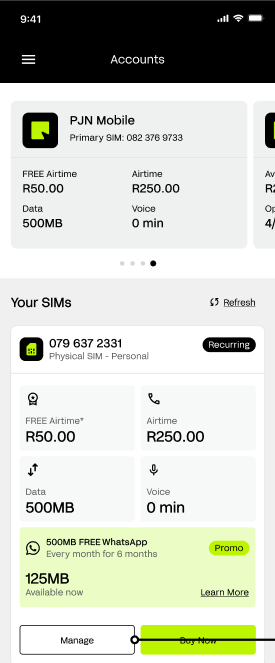
Open the PayJustNow app and tap Accounts at the bottom of the screen. Scroll down to the Your SIMs section where you'll see your active PJN Mobile SIM and your current balances.
Tap the 'Manage' button at the bottom of the screen.
Step 2
Open Your Plan Options
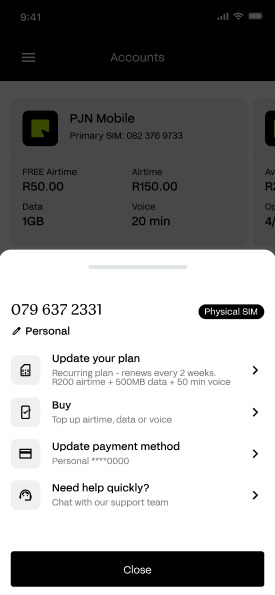
A pop-up menu will appear from the bottom of the screen showing options for your SIM. You'll see your number and SIM type at the top.
Step 3
Update Your Plan Page
You'll be taken to the Update Your Plan screen. This is the same screen where you originally set up your recurring plan. You can see your current selections for Airtime, Data, and Voice, and the billing period (Weekly, 2 Weekly, or Monthly).
To cancel, scroll to the bottom of the page and tap 'Cancel Recurring Plan'.
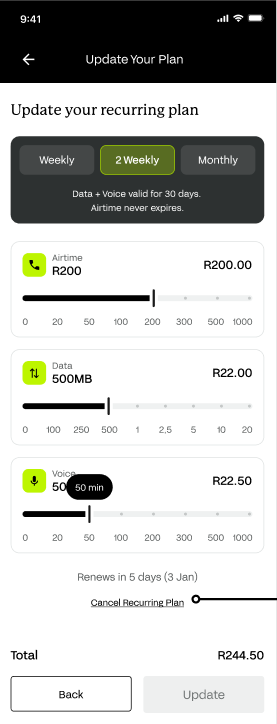
NOTE If you'd like to change your plan instead of cancelling, you can adjust your selections here and tap 'Update'. You only need to continue with the steps below if you want to cancel completely.
Step 4
Confirm Your Cancellation
A confirmation pop-up will appear asking: 'Cancel recurring plan?' It will remind you what you'll be giving up by switching back to Pay as you go.
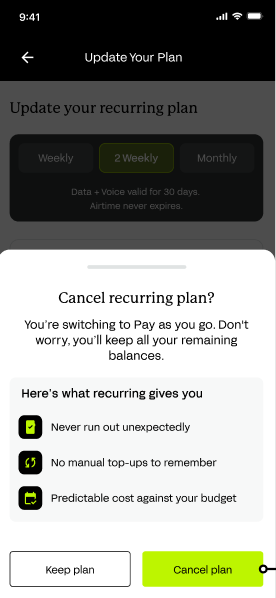
What recurring gives you:
- Never run out unexpectedly.
- No manual top-ups to remember.
- Predictable cost against your budget.
If you're sure you want to cancel, tap the green 'Cancel plan' button at the bottom of the screen. If you've changed your mind, tap 'Keep plan' to stay on your current recurring plan.
Cancelling switches you to Pay as you go. You won't be charged automatically anymore — but you'll need to manually top up when your balance runs low.
Step 5
Cancellation Confirmed
Once you tap 'Cancel plan', you'll be taken back to the Accounts page. A green notification banner at the top of the screen will confirm that your plan has been cancelled.
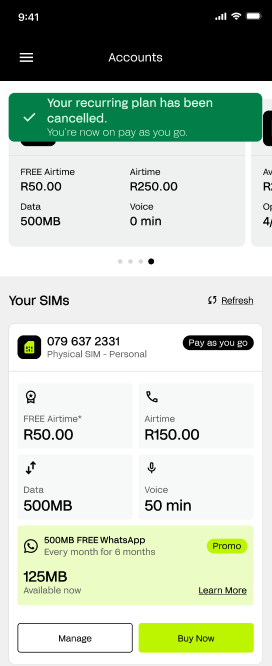
- The banner will read: 'Your recurring plan has been cancelled — You're now on pay as you go.'
- Your SIM card will now show 'Pay as you go' instead of 'Recurring'.
- Your remaining airtime, data, and voice balances are still available to use.
You can start a new recurring plan at any time by tapping 'Buy Now' on your SIM card and selecting your preferred bundles and billing period.
Troubleshooting
If something isn't working as expected, here are some quick fixes:
If you see this... | Try this |
I don't see the Manage button. | Scroll to the bottom of the Your SIMs section. The Manage button sits at the very bottom of your SIM card. |
The Cancel Recurring Plan link is missing. | Make sure you are on an active recurring plan. If you are on Pay as you go, this option will not appear. |
The cancellation didn't go through. | Close the app fully, reopen it, and check your SIM status. If it still shows recurring, contact our support team. |
I cancelled by mistake. | You can set up a new recurring plan at any time by tapping 'Buy Now' on your SIM card. |
Protecting Yourself from Fraud
Cancelling or changing your plan affects your billing, which makes it a target for scams. Be aware of the following scenarios and never act on unsolicited requests.
Fraud Scenario | What to Do |
Someone contacts you claiming to be PJN Mobile and asks you to cancel or confirm changes to your plan via a link | Plan changes and cancellations can only be made by you, inside the official PayJustNow app. Do not click links in unsolicited messages and never act on instructions to cancel your plan from someone else. |
You notice your recurring plan was cancelled, or your plan was changed, and you didn't do it yourself | Contact PJN Mobile support immediately to report the unauthorised change and secure your account. |
You're asked to approve an OTP or banking app prompt to "confirm" a cancellation you didn't request | Do not approve or share the OTP. Cancellation never requires bank-side approval. Contact PJN Mobile support and your bank immediately. |
Still stuck? Our support team is here to help. Reach us at pjn us directly from the app.
You're now on Pay as you go — stay in control of your spend.
Was this article helpful?
That’s Great!
Thank you for your feedback
Sorry! We couldn't be helpful
Thank you for your feedback
Feedback sent
We appreciate your effort and will try to fix the article