Getting started with your PayJustNow Mobile SIM card is quick and easy. This guide will walk you through the activation process, helping you get connected in just a few simple steps.
Follow the steps below to activate your new PJN Mobile SIM card and claim your FREE R20 Airtime promotion.
NOTE: Before you begin, make sure you have your PJN Mobile SIM card and SIM packaging available. You will need the 19-digit ICCID number printed above the barcode on the packaging to complete activation.
Activating Sim Card
Step 1: Open the PayJustNow App & Navigate to PJN Mobile
Open the PayJustNow App and navigate to the PJN Mobile section. Your dashboard will display your balances, including Free Airtime, Airtime, Data, and Voice.
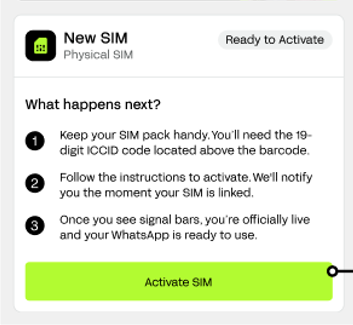
Scroll down to the Your SIMs section. You will see your inactive SIM listed as "New SIM — Physical SIM" with a Ready to Activate status.
Tap the Activate SIM button at the bottom of the screen.
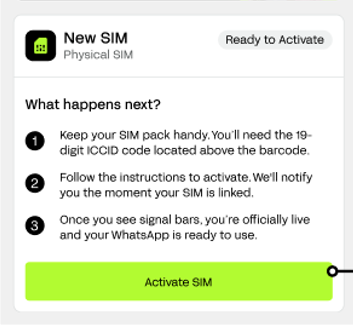
Step 2: Enter the Last 6 Digits of the ICCID
The Activate SIM screen will appear. The first 13 digits of the ICCID are pre-filled. Enter the last 6 digits of your ICCID number.
The ICCID is the 19-digit number printed above the barcode on the SIM card packaging (e.g. 8923 4509 8432 1906 902).
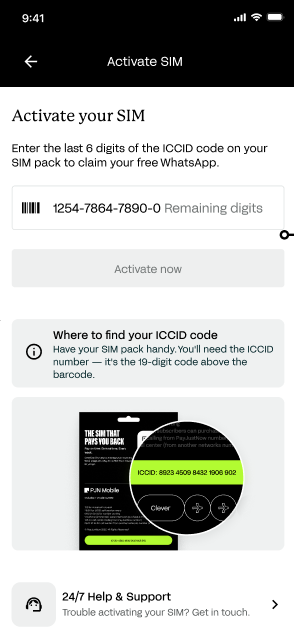
Step 3: Tap "Activate Now"
Once you have entered the last 6 digits, the Activate Now button will become active and turn green. Tap it to begin activation.
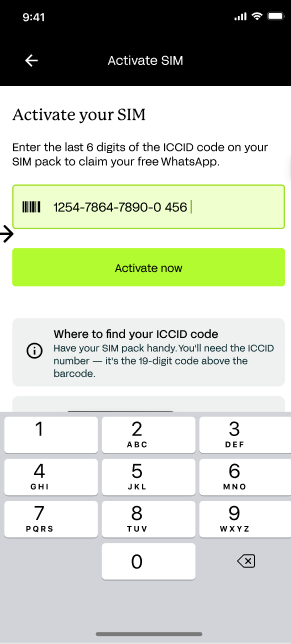
Step 4: Activation in Progress
The app will display an "Activating your SIM" loading screen. Please keep the app open during this process.
Once submitted, the app will move to an "Activation in progress" screen. Activation typically takes about one minute.
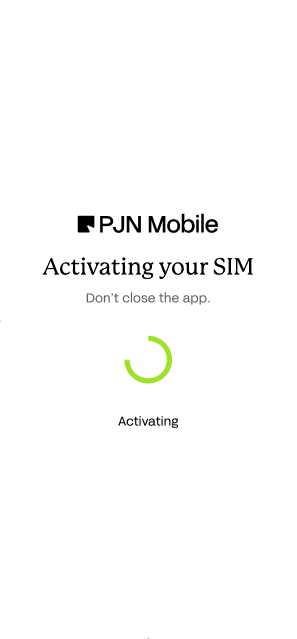
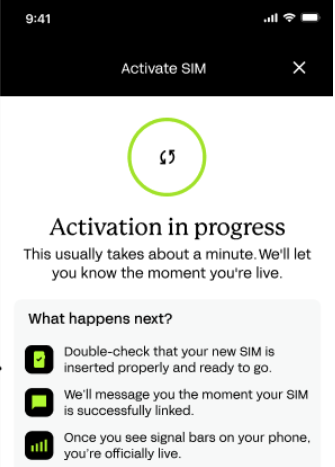
NOTE: You can tap "Go to Account" and continue using the app while activation completes in the background. You will be notified once your SIM is active.
Step 5: Monitor Activation Status
After tapping "Go to Account", your SIM status will display as Activating. No further action is required — the system will update automatically.
Step 6: Activation Complete
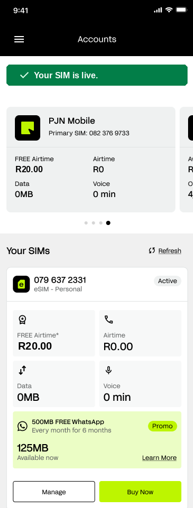
Once activation is successful, the app will display a confirmation banner:
Your SIM will now appear under Your SIMs with an Active status and the assigned number. You will also receive:
• R20.00 FREE Airtime
• 500MB FREE WhatsApp data — distributed as 125MB per week for 6 months when you load R50 or more.
Troubleshooting
Issue | Resolution |
ICCID not accepted | Make sure you are entering only the last 6 digits of the ICCID number and that it matches the pre-filled digits shown in the app. |
ICCID doesn't match at all / wrong SIM | If you have more than one SIM, double-check you're activating the correct one — the ICCID on your physical SIM packaging must match the SIM listed in your app. If they don't match at all, contact PJN Mobile support for assistance. |
Activation stuck / not progressing | Keep the app open and wait up to 3 minutes for activation to complete. |
SIM shows "Activating" for extended period | Ensure your SIM is inserted correctly, restart your phone, and wait for network signal bars to appear. |
WhatsApp only shows 125MB, not 500MB | This is expected. Your 500MB promotion is provided as 125MB per week. |
No signal after activation | Ensure the SIM is inserted correctly and manually select the Cell C network in your phone settings if required. |
Protecting Yourself from Fraud
SIM activation involves your ICCID number and account details, which makes it a target for scams. Be aware of the following scenarios and never act on unsolicited requests.
Fraud Scenario | What to Do |
Someone contacts you offering to activate your SIM for you, asking for your ICCID number | SIM activation is self-service via the app only. PJN Mobile will never ask you to activate your SIM over the phone — hang up and contact us directly. |
You receive an SMS or email asking you to "verify" your SIM activation via a link | Do not click links in unsolicited messages. Activate your SIM only inside the official PayJustNow app. |
You're asked to pay an "activation fee" before your SIM can be activated | SIM activation is completely free. Never pay anyone to activate your SIM — decline and contact PJN Mobile support. |
Your SIM activates but you didn't initiate it |
Was this article helpful?
That’s Great!
Thank you for your feedback
Sorry! We couldn't be helpful
Thank you for your feedback
Feedback sent
We appreciate your effort and will try to fix the article