Welcome to PJN Mobile! This guide will walk you through signing up and completing your RICA registration — all from within the PayJustNow app. The whole process takes just a few minutes.
Before you start, make sure you have your South African ID document handy.
Step 1: Find PJN Mobile in the App
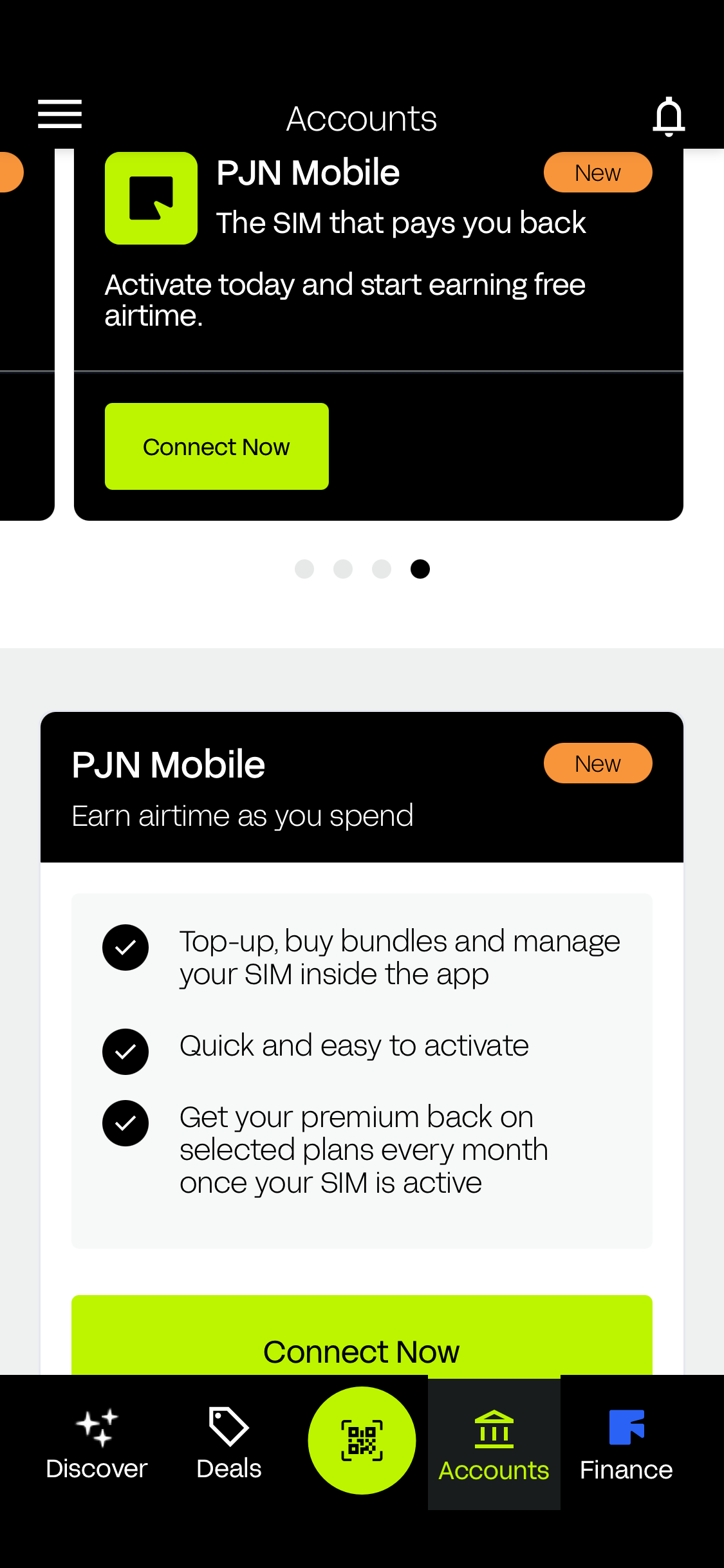
Open the PayJustNow app and tap on Accounts at the bottom of your screen. You'll see the PJN Mobile card — it's the one marked 'New'.
The card shows you what you get with PJN Mobile:
- Free 20 Airtime upon activation.
- Free 500MB WhatsApp data when you load R50 or more.
- Earn up to R200 airtime every month for on-time payments.
- No fixed bundles — recharge your way, no bill shock.
- Use your airtime and data on any network, any time.
Ready to get started? Tap the green 'Get Connected' button.
Step 2: Complete Your Profile
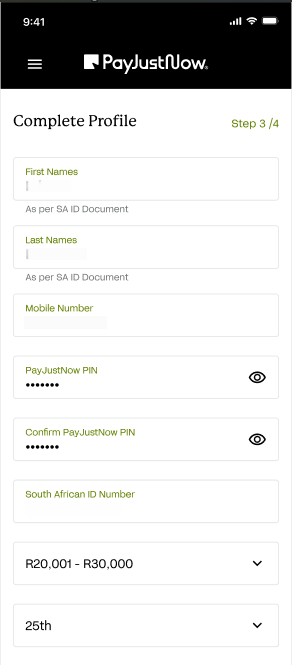
You'll be taken to the Complete Profile screen. Fill in each field carefully — your details need to match your South African ID document exactly for your RICA registration to go through.
Field | What to enter |
First Names | Enter your first names exactly as they appear on your SA ID document. |
Last Names | Enter your last names exactly as they appear on your SA ID document. |
Mobile Number | Enter the mobile number you want to register. |
PayJustNow PIN | Create a secure PIN for your account. You'll need to enter it twice to confirm. |
SA ID Number | Enter your 13-digit South African ID number. |
Salary Range | Select the income bracket that best describes your monthly salary. |
Salary Date | Select the day of the month you receive your salary. |
Q: Why does PJN Mobile ask for my salary range and salary date?
A: These two fields are used purely to determine your eligibility for PayJustNow's Buy Now Pay Later (BNPL) and credit features. They help us understand when you get paid so we can offer you payment plans that work around your pay cycle. Your salary information is not shared with any third parties and is not used for any other purpose.
Q: Will PJN Mobile share my salary information with anyone?
A: No. Your salary range and salary date are only used internally for BNPL and credit eligibility purposes. This information is handled in accordance with our Privacy Policy and applicable data protection laws, including POPIA. It will never be sold or shared with third parties.
Q: Do I need to provide my exact salary?
A: No. You simply select the income bracket that best describes your monthly salary — no exact figures are required. This is used only to assess which BNPL and credit options may be available to you and has no impact on your PJN Mobile SIM registration or any other features of your account.
TIP Double-check your names and ID number before moving on. If they don't match your ID document, your RICA registration will not go through. If this happens, simply go back and re-enter your details correctly — your registration will then be reprocessed automatically.
Step 3: Add Your Address & Give Consent
Next, you'll fill in your home address and give your consent to complete the sign-up.
Fill in your residential address:
- Address Line 1 — your building name or unit number.
- Address Line 2 — your street name and number.
- City Postal Code, and Province.
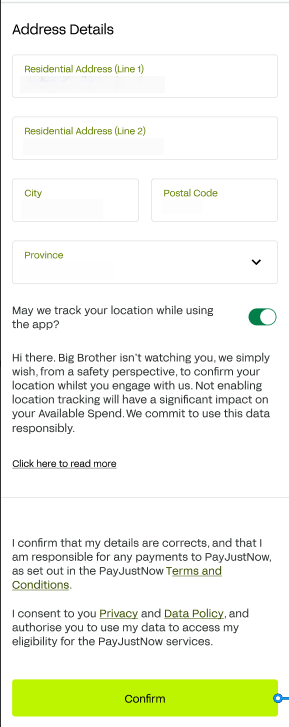
You'll also be asked if PJN Mobile can track your location while you use the app. This is optional but turning it on helps confirm your identity and may improve your Available Spend limit. If you choose not to allow location tracking, your sign-up will still proceed as normal.
Before tapping Confirm, please read and agree to the following:
- That your details are correct, and you accept responsibility for payments to PayJustNow.
- That you consent to the Privacy Policy and Data Policy and allow PayJustNow to check your eligibility.
Once you're happy, tap the green 'Confirm' button at the bottom of the screen.
Step 4: Your Free WhatsApp Benefit
Great news! Once your profile is confirmed, you'll receive R20 Airtime. WhatsApp data benefit — 500MB FREE every month when you load R50 or more.
TIP Your 500MB WhatsApp data will activate automatically after loading R50 or more. Please note the 500MB WhatsApp data is split into a weekly period — you will receive 125MB WhatsApp each week.
Step 5: Review Your Benefits & Order Your SIM Card
You're almost there! This screen gives you a full summary of everything included with your PJN Mobile SIM before you place your order.

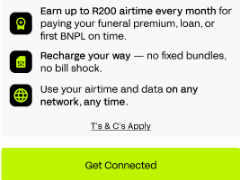
Here's a reminder of what's included:
- Free 20 Airtime upon activation.
- Free WhatsApp data when you load R50 or more.
- Earn up to R200 airtime for paying your funeral premium, loan, or first BNPL on time.
- Recharge your way — no fixed bundles, no bill shock.
- Use your airtime and data on any network, any time.
Happy with everything? Tap 'Get Connected' to move on to ordering your SIM.
Need a Hand?
If something isn't working as expected, here are some quick fixes:
If you see this... | Try this |
My details aren't saving. | Make sure all fields are filled in. Your ID number must be exactly 13 digits. |
My names don't match. | Use your full names exactly as they appear on your SA ID document. |
My RICA registration was rejected or didn't go through. | This is usually caused by a detail not matching your SA ID document exactly. Go back to Step 2, re-check your names and ID number, and resubmit with the corrected information — your registration will then be reprocessed. |
I made a PIN mistake. | Re-enter your PIN in both the PIN and Confirm PIN fields — they must match. |
The app is freezing or crashing. | Close the app fully and reopen it, then try again. If it keeps happening, contact our support team. |
I'm not sure about the T&Cs. | Tap the links in the app to read the full Privacy Policy and Terms & Conditions before confirming. |
Protecting Yourself from Fraud
Signing up involves your South African ID number, salary information, address, and a new account PIN — making this one of the most sensitive flows in the app. Be aware of the following scenarios and never act on unsolicited requests.
Fraud Scenario | What to Do |
Someone contacts you offering to help complete your sign-up or RICA registration, asking for your ID number or PIN | Sign-up and RICA registration can only be completed by you, in the official PayJustNow app. Never share your ID number, PIN, or banking details with anyone offering to sign up on your behalf. |
You receive an SMS or email with a "complete your RICA registration" or "verify your account" link | Do not click links in unsolicited messages. Complete your sign-up and RICA registration only inside the official PayJustNow app. |
Someone asks you to share your PayJustNow PIN over the phone, or to read out an OTP during sign-up | Never share your PIN or OTP with anyone, including someone claiming to be from PJN Mobile. We will never ask for these. Hang up and contact us directly through our official support channels. |
You notice an account was registered using your ID number that you did not create | Contact PJN Mobile support immediately to report identity misuse and secure your details. |
Still stuck? Our support team is here to help. Reach us directly from the app.
You're all set — welcome to PJN Mobile!
Was this article helpful?
That’s Great!
Thank you for your feedback
Sorry! We couldn't be helpful
Thank you for your feedback
Feedback sent
We appreciate your effort and will try to fix the article