Shoprite MoneyMarket is a convenient financial services platform that gives you access to services such as vouchers, money transfers, bill payments, and more, all from your phone through the Money Market App.
Now, you can also purchase MoneyMarket vouchers using PayJustNow, making it even easier to access the funds you need when you need them.
Before you purchase a Shoprite MoneyMarket voucher, you'll need to be a registered MoneyMarket customer. If you haven't already, please register for Money Market, create your account, and download the MoneyMarket App to get started. Follow the guides below to sign up for a Shoprite Money Market account.
How to Sign Up for a MoneyMarket account

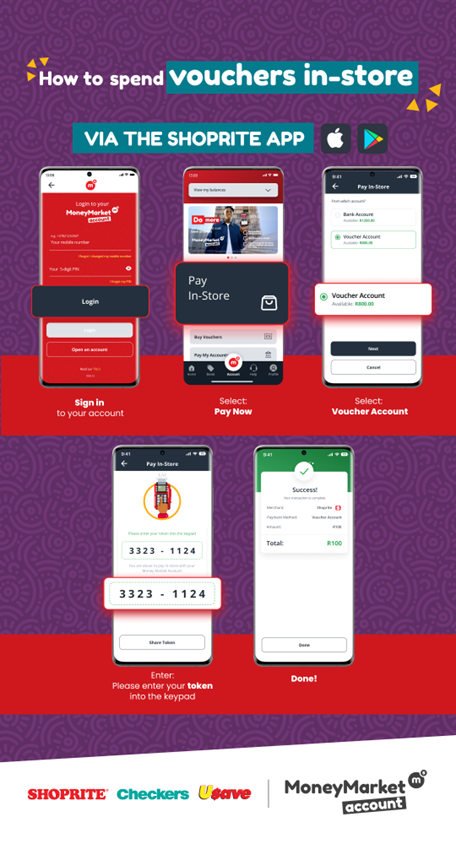
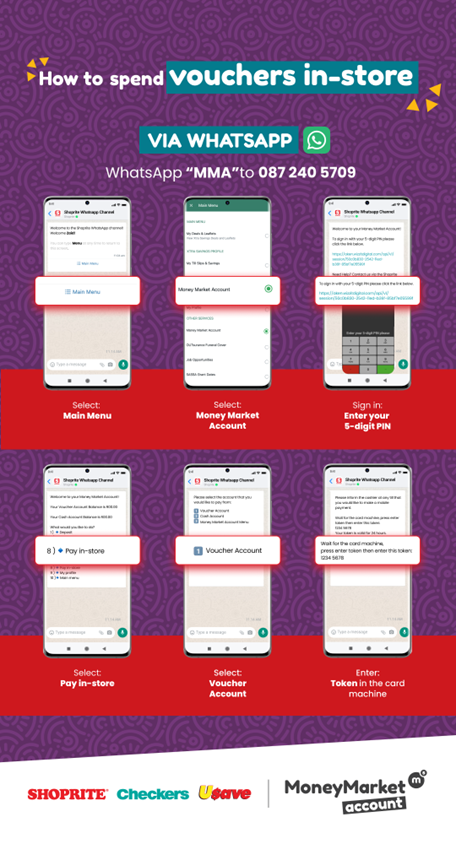
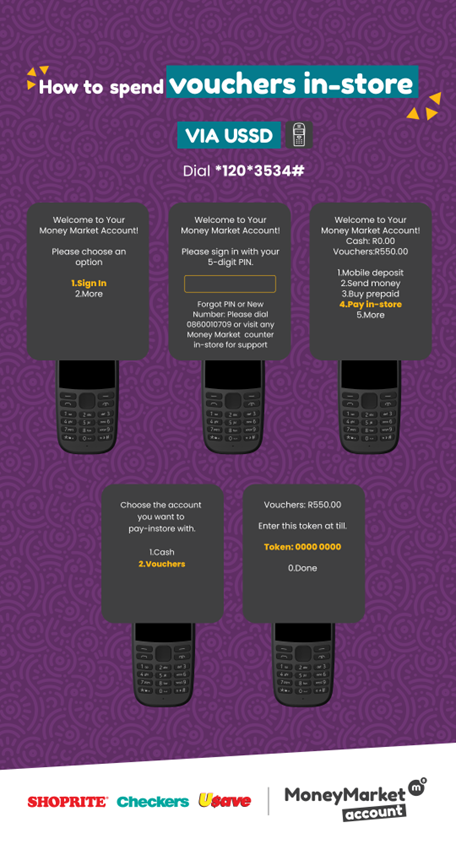
How to spend your MoneyMarket vouchers in store
Frequently Asked Questions
| What is the expected turnaround time if I log a voucher query with Shoprite? | Upto 72hrs |
| I bought a voucher but did not receive an SMS. | Log into your MoneyMarket account or dial *120*3534# to view your voucher balance |
| I used the incorrect number, I need to move the voucher to a different number. | Contact the Shoprite Call Centre for additional support |
| I don't want a voucher anymore. Please credit my PJN wallet. | Contact the Shoprite Call Centre to request a refund |
| My Money Market Account is registered to a different number to my PJN account. | Contact the Shoprite Call Centre for additional support |
| Where can I spend my voucher? | Vouchers can be spent at any Shoprite, Usave, Checkers, Checkers Hyper, Petshop Science, Uniq or on Sixty60. |
| Can I convert my voucher to cash? | No, vouchers are not redeemable for cash. |
| How do I pay using my voucher? | See how to guide above |
Shoprite Contact Centre
For queries regarding your MoneyMarket account, please contact the Shoprite Contact Centre:
Tel: 0860 01 07 09
Email: help@moneymarketaccount.co.za
Was this article helpful?
That’s Great!
Thank you for your feedback
Sorry! We couldn't be helpful
Thank you for your feedback
Feedback sent
We appreciate your effort and will try to fix the article